快速开始
大约 5 分钟
React Native 集成文档
快速开始
本文介绍如何极简集成即时通讯 React-Native SDK,在你的 app 中实现发送和接收单聊文本消息。
实现原理
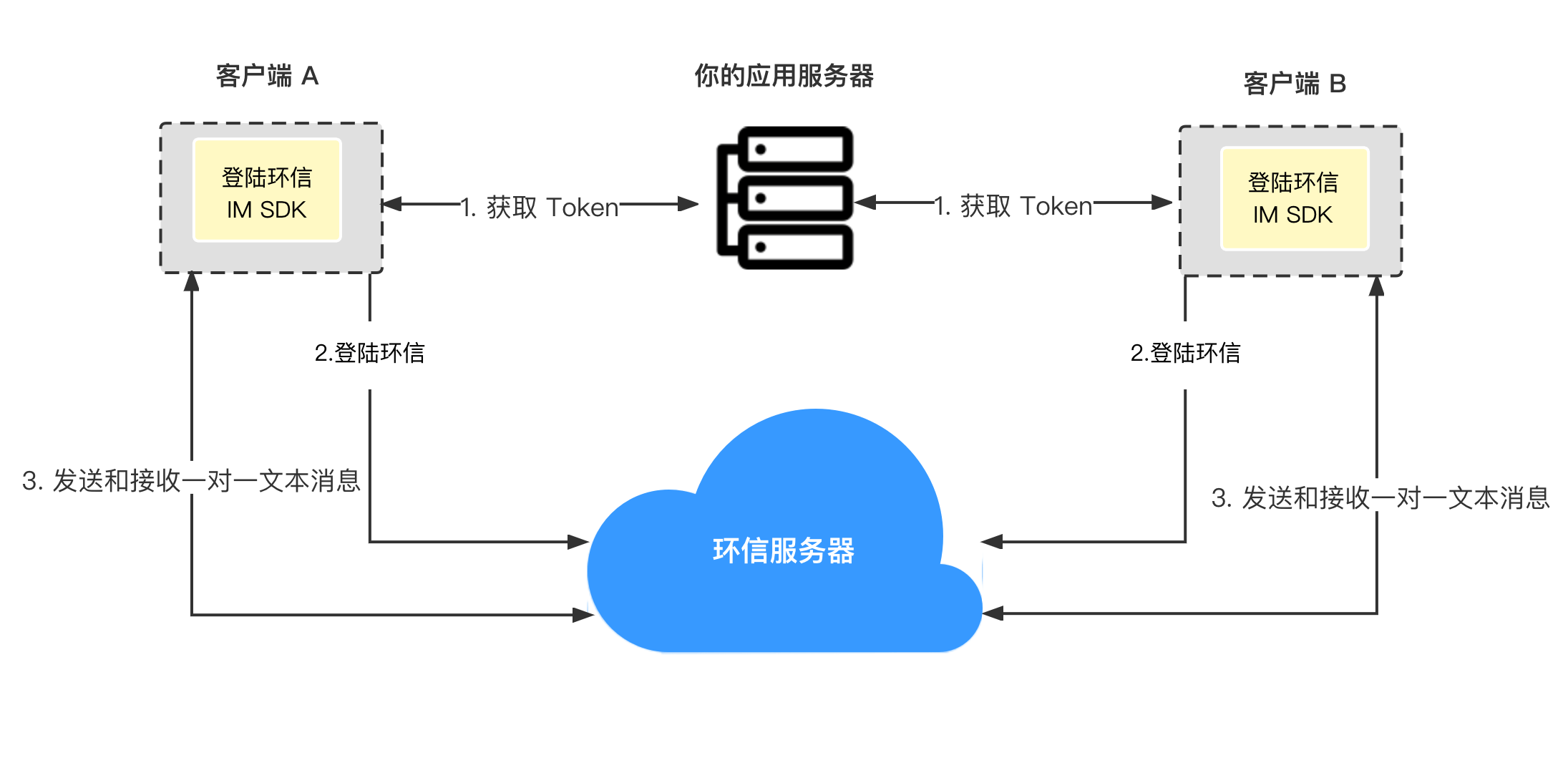
下图展示在客户端发送和接收一对一文本消息的工作流程。
前提条件
集成前请确认 app 的开发和运行环境满足以下要求:
对于 iOS 平台:
- MacOS 10.15.7 或以上版本
- Xcode 12.4 或以上版本,包括命令行工具
- React Native 0.66.5 或以上版本
- NodeJs 16 或以上版本,包含 npm 包管理工具
- CocoaPods 包管理工具
- Yarn 编译运行工具
- Watchman 调试工具
- 运行环境真机或模拟器 iOS 10.0 或以上版本
对于 Android 平台:
- MacOS 10.15.7 或以上版本,Windows 10 或以上版本
- Android Studio 4.0 或以上版本,包括 JDK 1.8 或以上版本
- React Native 0.66.5 或以上版本
- 如果用 Macos 系统开发,需要 CocoaPods 包管理工具
- 如果用 Windows 开发,需要 Powershell 5.1 或以上版本
- NodeJs 16 或以上版本,包含 npm 包管理工具
- Yarn 编译运行工具
- Watchman 调试工具
- 运行环境真机或模拟器 Android 6.0 或以上版本
配置开发或者运行环境如果遇到问题,请参考 React Native 官网。
其他要求
有效的即时通讯 IM 开发者账号和 App ID,详见声网控制台 注册账号 和 获取项目的 App ID 说明。
项目设置
创建一个 React Native 项目,集成 IM SDK:
- 根据开发系统和目标平台准备开发环境;
- 打开终端,进入需要创建项目的目录,输入命令创建 React Native 项目:
npx @react-native-community/cli@latest init --version "0.83.2" simple_demo # 推荐创建稳定版本示例
创建好的项目名称是 simple_demo。
初始化项目如下:
cd simple_demo
yarn set version 1.22.19
yarn
也可以使用 npm 等其他工具。
- 在终端命令行,输入以下命令添加依赖:
yarn add react-native-chat-sdk
- native 部分初始化
iOS 平台需要使用 cocoapods 进行初始化。
cd ios && pod install && cd ..
创建用户
在 声网控制台 创建用户,获取用户 ID 和用户 token 用于登录。详见 创建用户文档。
在生产环境中,为了安全考虑,你需要在你的应用服务器集成 Token 鉴权 实现获取 Token 的业务逻辑,使你的用户从你的应用服务器获取 Token。
实现发送和接收单聊消息
建议使用 visual studio code 打开文件夹 simple_demo,打开文件 App.js,删除全部内容,并添加如下内容:
// Import depend packages.
import React, {useEffect} from 'react';
import {
  SafeAreaView,
  ScrollView,
  StyleSheet,
  Text,
  TextInput,
  View,
} from 'react-native';
import {
  ChatClient,
  ChatOptions,
  ChatMessageChatType,
  ChatMessage,
  ChatConnectEventListener,
} from 'react-native-chat-sdk';

// Defines the App object.
const App = () => {
  // Defines the variable.
  const title = 'ChatQuickstart';
  // Replaces <your appId> with your App ID.
  const appId = '<your appId>';
  // Replaces <your userId> with your user ID.
  const [username, setUsername] = React.useState('<your userId>');
  // Replaces <your token> with your token.
  const [chatToken, setChatToken] = React.useState('<your token>');
  const [targetId, setTargetId] = React.useState('');
  const [content, setContent] = React.useState('');
  const [logText, setWarnText] = React.useState('Show log area');
  const chatClient = ChatClient.getInstance();
  const chatManager = chatClient.chatManager;


  // Outputs console logs.
  useEffect(() => {
    logText.split('\n').forEach((value, index, array) => {
      if (index === 0) {
        console.log(value);
      }
    });
  }, [logText]);

  // Outputs UI logs.
  const rollLog = text => {
    setWarnText(preLogText => {
      let newLogText = text;
      preLogText
        .split('\n')
        .filter((value, index, array) => {
          if (index > 8) {
            return false;
          }
          return true;
        })
        .forEach((value, index, array) => {
          newLogText += '\n' + value;
        });
      return newLogText;
    });
  };

  useEffect(() => {
    // Registers listeners for messaging.
    const setMessageListener = () => {
      let msgListener = {
        onMessagesReceived(messages) {
          for (let index = 0; index < messages.length; index++) {
            rollLog('received msgId: ' + messages[index].msgId);
          }
        },
        onCmdMessagesReceived: messages => {},
        onMessagesRead: messages => {},
        onGroupMessageRead: groupMessageAcks => {},
        onMessagesDelivered: messages => {},
        onMessagesRecalled: messages => {},
        onConversationsUpdate: () => {},
        onConversationRead: (from, to) => {},
      };

      chatManager.removeAllMessageListener();
      chatManager.addMessageListener(msgListener);
    };

    // Initializes the SDK.
    // Initializes any interface before calling it.
    const init = () => {
      let o = ChatOptions.withAppId({
        autoLogin: false,
        appId: appId,
      });
      chatClient.removeAllConnectionListener();
      chatClient
        .init(o)
        .then(() => {
          rollLog('init success');
          let listener = {
            onTokenWillExpire() {
              rollLog('token expire.');
            },
            onTokenDidExpire() {
              rollLog('token did expire');
            },
            onConnected() {
              rollLog('onConnected');
              setMessageListener();
            },
            onDisconnected() {
              rollLog('onDisconnected:' + errorCode);
            },
          } as ChatConnectEventListener;
          chatClient.addConnectionListener(listener);
        })
        .catch(error => {
          rollLog(
            'init fail: ' +
              (error instanceof Object ? JSON.stringify(error) : error),
          );
        });
    };

    init();
  }, [chatClient, chatManager, appId]);

  // Logs in with an account ID and a token.
  const login = () => {
    rollLog('start login ...');
    chatClient
      .loginWithToken(username, chatToken)
      .then(() => {
        rollLog('login operation success.');
      })
      .catch(reason => {
        rollLog('login fail: ' + JSON.stringify(reason));
      });
  };

  // Logs out from server.
  const logout = () => {
    rollLog('start logout ...');
    chatClient
      .logout()
      .then(() => {
        rollLog('logout success.');
      })
      .catch(reason => {
        rollLog('logout fail:' + JSON.stringify(reason));
      });
  };

  // Sends a text message to somebody.
  const sendmsg = () => {
    let msg = ChatMessage.createTextMessage(
      targetId,
      content,
      ChatMessageChatType.PeerChat,
    );
    const callback = new (class {
      onProgress(locaMsgId, progress) {
        rollLog(`send message process: ${locaMsgId}, ${progress}`);
      }
      onError(locaMsgId, error) {
        rollLog(`send message fail: ${locaMsgId}, ${JSON.stringify(error)}`);
      }
      onSuccess(message) {
        rollLog('send message success: ' + message.localMsgId);
      }
    })();
    rollLog('start send message ...');
    chatClient.chatManager
      .sendMessage(msg, callback)
      .then(() => {
        rollLog('send message: ' + msg.localMsgId);
      })
      .catch(reason => {
        rollLog('send fail: ' + JSON.stringify(reason));
      });
  };

  // Renders the UI.
  return (
    <SafeAreaView>
      <View style={styles.titleContainer}>
        <Text style={styles.title}>{title}</Text>
      </View>
      <ScrollView>
        <View style={styles.inputCon}>
          <TextInput
            multiline
            style={styles.inputBox}
            placeholder="Enter username"
            onChangeText={text => setUsername(text)}
            value={username}
            autoCapitalize={'none'}
          />
        </View>
        <View style={styles.inputCon}>
          <TextInput
            multiline
            style={styles.inputBox}
            placeholder="Enter chatToken"
            onChangeText={text => setChatToken(text)}
            value={chatToken}
            autoCapitalize={'none'}
          />
        </View>
        <View style={styles.buttonCon}>
          <Text style={styles.eachBtn} onPress={login}>
            SIGN IN
          </Text>
          <Text style={styles.eachBtn} onPress={logout}>
            SIGN OUT
          </Text>
        </View>
        <View style={styles.inputCon}>
          <TextInput
            multiline
            style={styles.inputBox}
            placeholder="Enter the username you want to send"
            onChangeText={text => setTargetId(text)}
            value={targetId}
            autoCapitalize={'none'}
          />
        </View>
        <View style={styles.inputCon}>
          <TextInput
            multiline
            style={styles.inputBox}
            placeholder="Enter content"
            onChangeText={text => setContent(text)}
            value={content}
            autoCapitalize={'none'}
          />
        </View>
        <View style={styles.buttonCon}>
          <Text style={styles.btn2} onPress={sendmsg}>
            SEND TEXT
          </Text>
        </View>
        <View>
          <Text style={styles.logText}>{logText}</Text>
        </View>
        <View>
          <Text style={styles.logText}>{}</Text>
        </View>
        <View>
          <Text style={styles.logText}>{}</Text>
        </View>
      </ScrollView>
    </SafeAreaView>
  );
};

// Sets UI styles.
const styles = StyleSheet.create({
  titleContainer: {
    height: 60,
    backgroundColor: '#6200ED',
  },
  title: {
    lineHeight: 60,
    paddingLeft: 15,
    color: '#fff',
    fontSize: 20,
    fontWeight: '700',
  },
  inputCon: {
    marginLeft: '5%',
    width: '90%',
    height: 60,
    paddingBottom: 6,
    borderBottomWidth: 1,
    borderBottomColor: '#ccc',
  },
  inputBox: {
    marginTop: 15,
    width: '100%',
    fontSize: 14,
    fontWeight: 'bold',
  },
  buttonCon: {
    marginLeft: '2%',
    width: '96%',
    flexDirection: 'row',
    marginTop: 20,
    height: 26,
    justifyContent: 'space-around',
    alignItems: 'center',
  },
  eachBtn: {
    height: 40,
    width: '28%',
    lineHeight: 40,
    textAlign: 'center',
    color: '#fff',
    fontSize: 16,
    backgroundColor: '#6200ED',
    borderRadius: 5,
  },
  btn2: {
    height: 40,
    width: '45%',
    lineHeight: 40,
    textAlign: 'center',
    color: '#fff',
    fontSize: 16,
    backgroundColor: '#6200ED',
    borderRadius: 5,
  },
  logText: {
    padding: 10,
    marginTop: 10,
    color: '#ccc',
    fontSize: 14,
    lineHeight: 20,
  },
});

export default App;
编译和运行项目
编译运行 iOS 平台应用:
yarn run ios
编译运行 Android 平台应用:
yarn run android
运行调试服务:
yarn run start
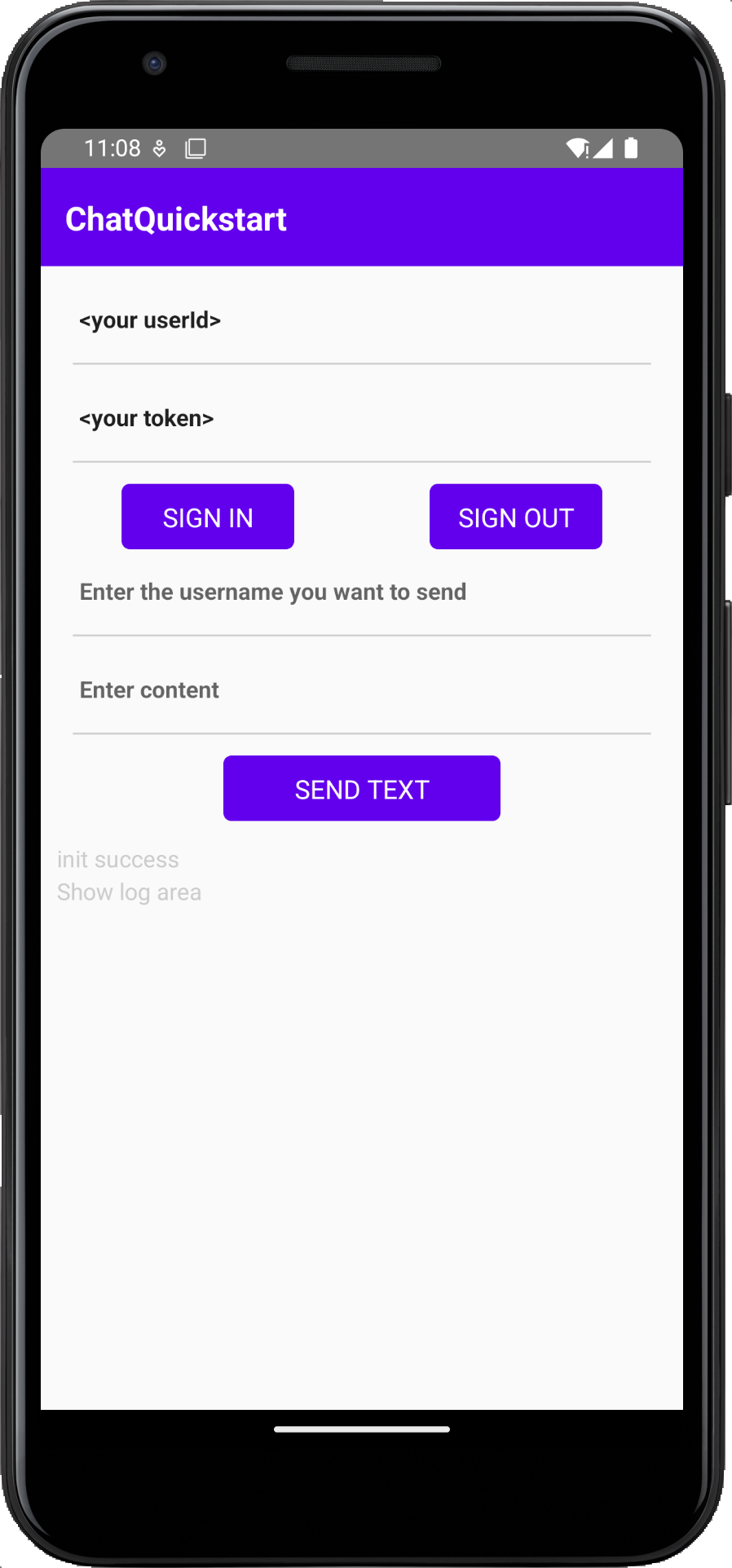
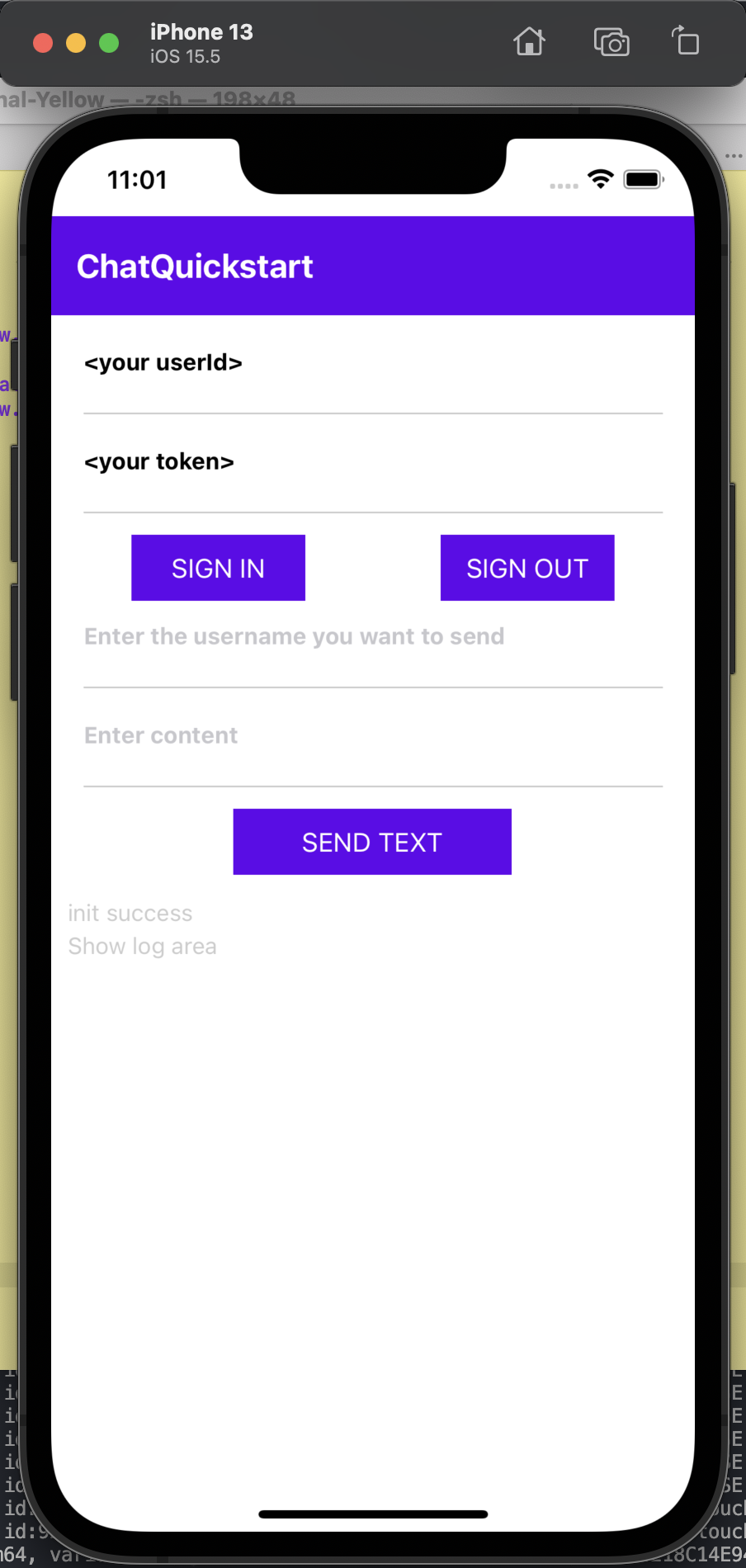
下图为 Android 和 iOS 平台的效果展示:
| Android | iOS |
|---|---|
 |  |
测试你的 app
参考以下代码测试注册账号,登录,发送和接收消息。
- 输入用户名和 token,点击 登录。
- 在另外设备可以登录另外一个用户。
- 第一个用户,编辑消息并点击 发送,第二个用户将接收消息。
同时,你可以在下方查看日志,检查注册,登录,发送消息是否成功。
更多操作
在生产环境中,为了安全考虑,你需要在你的应用服务器集成Token 鉴权 实现获取 Token 的业务逻辑,使你的用户从你的应用服务器获取 Token。